Backblaze B2 公开桶需要绑定支付方式,私密桶无需信用卡,本文使用私密桶部署
一、创建 Backblaze B2 私密桶
登录 Backblaze ,默认来到桶 (Buckets) 页面。
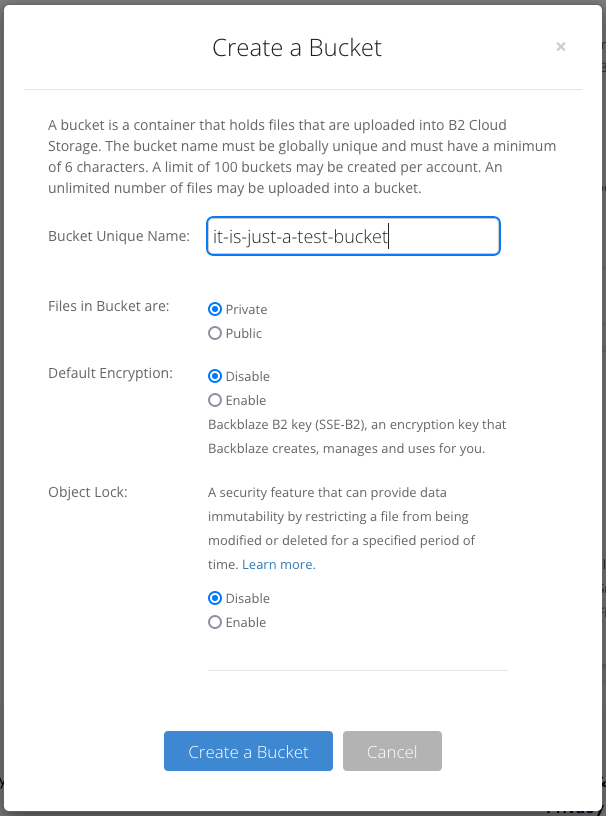
点击 Create a Bucket ,在 Bucket Unique Name 项填入桶名称,其余项保持默认即可。
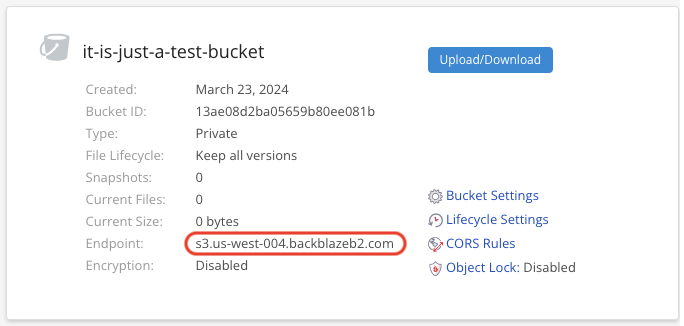
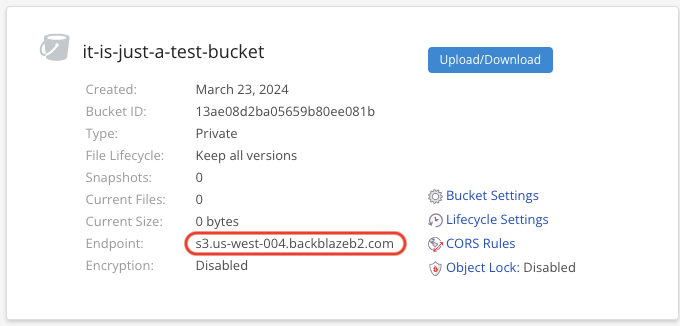
生成后记下 Endpoint 的值,后面要用到两次。
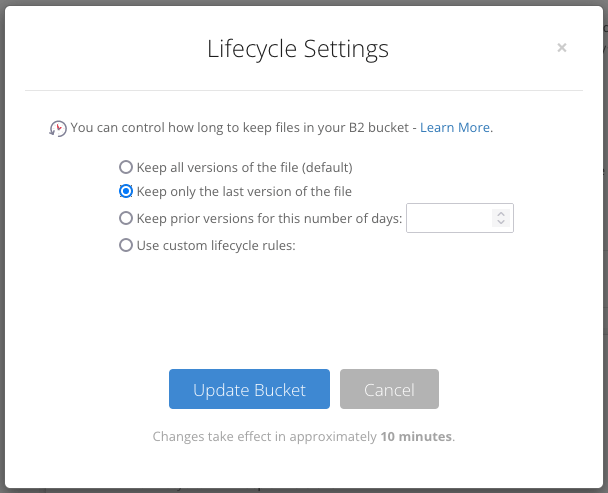
点击 Lifecycle Settings ,选择 Keep only the last version of the file 。点击 Update Bucket 按钮。
二、创建应用程序密钥 (Application Key)
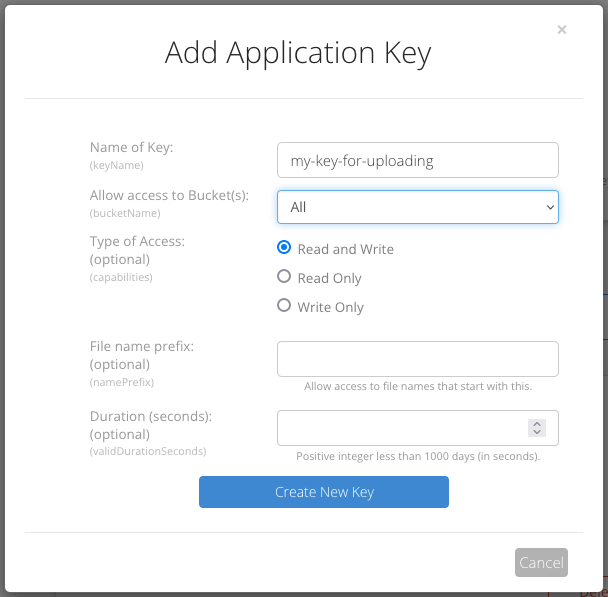
点击页面左侧菜单 Account 项下的 Application Keys ,然后点击 Add a New Application Key ,在 Name of Key 项填写应用程序密钥名称,其余保持默认即可。
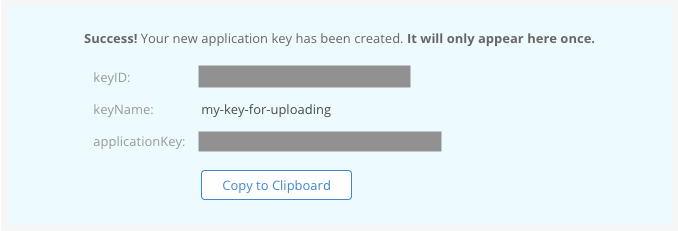
创建应用程序密钥后,复制信息保存好(关掉就不再显示了!),后面要用到两次。
三、创建 Cloudflare Worker
登录 Cloudflare ,点击页面左侧菜单中 Workers 和 Pages ,右侧页面中点击 创建应用程序,点击 创建 Worker 按钮。
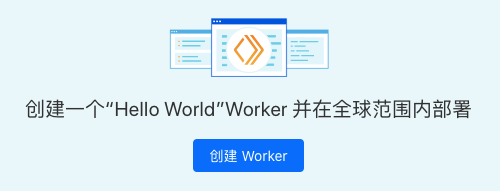
部署 “Hello World” 脚本 页面,填入 Worker 名称,点击 部署 按钮。
等待部署成功后点击右上角 编辑代码 按钮,在页面中代码替换为以下代码:
// node_modules/aws4fetch/dist/aws4fetch.esm.mjs
var encoder = new TextEncoder();
var HOST_SERVICES = {
  appstream2: "appstream",
  cloudhsmv2: "cloudhsm",
  email: "ses",
  marketplace: "aws-marketplace",
  mobile: "AWSMobileHubService",
  pinpoint: "mobiletargeting",
  queue: "sqs",
  "git-codecommit": "codecommit",
  "mturk-requester-sandbox": "mturk-requester",
  "personalize-runtime": "personalize"
};
var UNSIGNABLE_HEADERS = /* @__PURE__ */ new Set([
  "authorization",
  "content-type",
  "content-length",
  "user-agent",
  "presigned-expires",
  "expect",
  "x-amzn-trace-id",
  "range",
  "connection"
]);
var AwsClient = class {
  constructor({ accesskeyID, secretAccessKey, sessionToken, service, region, cache, retries, initRetryMs }) {
    if (accesskeyID == null)
      throw new TypeError("accesskeyID is a required option");
    if (secretAccessKey == null)
      throw new TypeError("secretAccessKey is a required option");
    this.accesskeyID = accesskeyID;
    this.secretAccessKey = secretAccessKey;
    this.sessionToken = sessionToken;
    this.service = service;
    this.region = region;
    this.cache = cache || /* @__PURE__ */ new Map();
    this.retries = retries != null ? retries : 10;
    this.initRetryMs = initRetryMs || 50;
  }
  async sign(input, init) {
    if (input instanceof Request) {
      const { method, url, headers, body } = input;
      init = Object.assign({ method, url, headers }, init);
      if (init.body == null && headers.has("Content-Type")) {
        init.body = body != null && headers.has("X-Amz-Content-Sha256") ? body : await input.clone().arrayBuffer();
      }
      input = url;
    }
    const signer = new AwsV4Signer(Object.assign({ url: input }, init, this, init && init.aws));
    const signed = Object.assign({}, init, await signer.sign());
    delete signed.aws;
    try {
      return new Request(signed.url.toString(), signed);
    } catch (e) {
      if (e instanceof TypeError) {
        return new Request(signed.url.toString(), Object.assign({ duplex: "half" }, signed));
      }
      throw e;
    }
  }
  async fetch(input, init) {
    for (let i = 0; i <= this.retries; i++) {
      const fetched = fetch(await this.sign(input, init));
      if (i === this.retries) {
        return fetched;
      }
      const res = await fetched;
      if (res.status < 500 && res.status !== 429) {
        return res;
      }
      await new Promise((resolve) => setTimeout(resolve, Math.random() * this.initRetryMs * Math.pow(2, i)));
    }
    throw new Error("An unknown error occurred, ensure retries is not negative");
  }
};
var AwsV4Signer = class {
  constructor({ method, url, headers, body, accesskeyID, secretAccessKey, sessionToken, service, region, cache, datetime, signQuery, appendSessionToken, allHeaders, singleEncode }) {
    if (url == null)
      throw new TypeError("url is a required option");
    if (accesskeyID == null)
      throw new TypeError("accesskeyID is a required option");
    if (secretAccessKey == null)
      throw new TypeError("secretAccessKey is a required option");
    this.method = method || (body ? "POST" : "GET");
    this.url = new URL(url);
    this.headers = new Headers(headers || {});
    this.body = body;
    this.accesskeyID = accesskeyID;
    this.secretAccessKey = secretAccessKey;
    this.sessionToken = sessionToken;
    let guessedService, guessedRegion;
    if (!service || !region) {
      [guessedService, guessedRegion] = guessServiceRegion(this.url, this.headers);
    }
    this.service = service || guessedService || "";
    this.region = region || guessedRegion || "us-east-1";
    this.cache = cache || /* @__PURE__ */ new Map();
    this.datetime = datetime || (/* @__PURE__ */ new Date()).toISOString().replace(/[:-]|\.\d{3}/g, "");
    this.signQuery = signQuery;
    this.appendSessionToken = appendSessionToken || this.service === "iotdevicegateway";
    this.headers.delete("Host");
    if (this.service === "s3" && !this.signQuery && !this.headers.has("X-Amz-Content-Sha256")) {
      this.headers.set("X-Amz-Content-Sha256", "UNSIGNED-PAYLOAD");
    }
    const params = this.signQuery ? this.url.searchParams : this.headers;
    params.set("X-Amz-Date", this.datetime);
    if (this.sessionToken && !this.appendSessionToken) {
      params.set("X-Amz-Security-Token", this.sessionToken);
    }
    this.signableHeaders = ["host", ...this.headers.keys()].filter((header) => allHeaders || !UNSIGNABLE_HEADERS.has(header)).sort();
    this.signedHeaders = this.signableHeaders.join(";");
    this.canonicalHeaders = this.signableHeaders.map((header) => header + ":" + (header === "host" ? this.url.host : (this.headers.get(header) || "").replace(/\s+/g, " "))).join("\n");
    this.credentialString = [this.datetime.slice(0, 8), this.region, this.service, "aws4_request"].join("/");
    if (this.signQuery) {
      if (this.service === "s3" && !params.has("X-Amz-Expires")) {
        params.set("X-Amz-Expires", "86400");
      }
      params.set("X-Amz-Algorithm", "AWS4-HMAC-SHA256");
      params.set("X-Amz-Credential", this.accesskeyID + "/" + this.credentialString);
      params.set("X-Amz-SignedHeaders", this.signedHeaders);
    }
    if (this.service === "s3") {
      try {
        this.encodedPath = decodeURIComponent(this.url.pathname.replace(/\+/g, " "));
      } catch (e) {
        this.encodedPath = this.url.pathname;
      }
    } else {
      this.encodedPath = this.url.pathname.replace(/\/+/g, "/");
    }
    if (!singleEncode) {
      this.encodedPath = encodeURIComponent(this.encodedPath).replace(/%2F/g, "/");
    }
    this.encodedPath = encodeRfc3986(this.encodedPath);
    const seenKeys = /* @__PURE__ */ new Set();
    this.encodedSearch = [...this.url.searchParams].filter(([k]) => {
      if (!k)
        return false;
      if (this.service === "s3") {
        if (seenKeys.has(k))
          return false;
        seenKeys.add(k);
      }
      return true;
    }).map((pair) => pair.map((p) => encodeRfc3986(encodeURIComponent(p)))).sort(([k1, v1], [k2, v2]) => k1 < k2 ? -1 : k1 > k2 ? 1 : v1 < v2 ? -1 : v1 > v2 ? 1 : 0).map((pair) => pair.join("=")).join("&");
  }
  async sign() {
    if (this.signQuery) {
      this.url.searchParams.set("X-Amz-Signature", await this.signature());
      if (this.sessionToken && this.appendSessionToken) {
        this.url.searchParams.set("X-Amz-Security-Token", this.sessionToken);
      }
    } else {
      this.headers.set("Authorization", await this.authHeader());
    }
    return {
      method: this.method,
      url: this.url,
      headers: this.headers,
      body: this.body
    };
  }
  async authHeader() {
    return [
      "AWS4-HMAC-SHA256 Credential=" + this.accesskeyID + "/" + this.credentialString,
      "SignedHeaders=" + this.signedHeaders,
      "Signature=" + await this.signature()
    ].join(", ");
  }
  async signature() {
    const date = this.datetime.slice(0, 8);
    const cacheKey = [this.secretAccessKey, date, this.region, this.service].join();
    let kCredentials = this.cache.get(cacheKey);
    if (!kCredentials) {
      const kDate = await hmac("AWS4" + this.secretAccessKey, date);
      const kRegion = await hmac(kDate, this.region);
      const kService = await hmac(kRegion, this.service);
      kCredentials = await hmac(kService, "aws4_request");
      this.cache.set(cacheKey, kCredentials);
    }
    return buf2hex(await hmac(kCredentials, await this.stringToSign()));
  }
  async stringToSign() {
    return [
      "AWS4-HMAC-SHA256",
      this.datetime,
      this.credentialString,
      buf2hex(await hash(await this.canonicalString()))
    ].join("\n");
  }
  async canonicalString() {
    return [
      this.method.toUpperCase(),
      this.encodedPath,
      this.encodedSearch,
      this.canonicalHeaders + "\n",
      this.signedHeaders,
      await this.hexBodyHash()
    ].join("\n");
  }
  async hexBodyHash() {
    let hashHeader = this.headers.get("X-Amz-Content-Sha256") || (this.service === "s3" && this.signQuery ? "UNSIGNED-PAYLOAD" : null);
    if (hashHeader == null) {
      if (this.body && typeof this.body !== "string" && !("byteLength" in this.body)) {
        throw new Error("body must be a string, ArrayBuffer or ArrayBufferView, unless you include the X-Amz-Content-Sha256 header");
      }
      hashHeader = buf2hex(await hash(this.body || ""));
    }
    return hashHeader;
  }
};
async function hmac(key, string) {
  const cryptoKey = await crypto.subtle.importKey(
    "raw",
    typeof key === "string" ? encoder.encode(key) : key,
    { name: "HMAC", hash: { name: "SHA-256" } },
    false,
    ["sign"]
  );
  return crypto.subtle.sign("HMAC", cryptoKey, encoder.encode(string));
}
async function hash(content) {
  return crypto.subtle.digest("SHA-256", typeof content === "string" ? encoder.encode(content) : content);
}
function buf2hex(buffer) {
  return Array.prototype.map.call(new Uint8Array(buffer), (x) => ("0" + x.toString(16)).slice(-2)).join("");
}
function encodeRfc3986(urlEncodedStr) {
  return urlEncodedStr.replace(/[!'()*]/g, (c) => "%" + c.charCodeAt(0).toString(16).toUpperCase());
}
function guessServiceRegion(url, headers) {
  const { hostname, pathname } = url;
  if (hostname.endsWith(".r2.cloudflarestorage.com")) {
    return ["s3", "auto"];
  }
  if (hostname.endsWith(".backblazeb2.com")) {
    const match2 = hostname.match(/^(?:[^.]+\.)?s3\.([^.]+)\.backblazeb2\.com$/);
    return match2 != null ? ["s3", match2[1]] : ["", ""];
  }
  const match = hostname.replace("dualstack.", "").match(/([^.]+)\.(?:([^.]*)\.)?amazonaws\.com(?:\.cn)?$/);
  let [service, region] = (match || ["", ""]).slice(1, 3);
  if (region === "us-gov") {
    region = "us-gov-west-1";
  } else if (region === "s3" || region === "s3-accelerate") {
    region = "us-east-1";
    service = "s3";
  } else if (service === "iot") {
    if (hostname.startsWith("iot.")) {
      service = "execute-api";
    } else if (hostname.startsWith("data.jobs.iot.")) {
      service = "iot-jobs-data";
    } else {
      service = pathname === "/mqtt" ? "iotdevicegateway" : "iotdata";
    }
  } else if (service === "autoscaling") {
    const targetPrefix = (headers.get("X-Amz-Target") || "").split(".")[0];
    if (targetPrefix === "AnyScaleFrontendService") {
      service = "application-autoscaling";
    } else if (targetPrefix === "AnyScaleScalingPlannerFrontendService") {
      service = "autoscaling-plans";
    }
  } else if (region == null && service.startsWith("s3-")) {
    region = service.slice(3).replace(/^fips-|^external-1/, "");
    service = "s3";
  } else if (service.endsWith("-fips")) {
    service = service.slice(0, -5);
  } else if (region && /-\d$/.test(service) && !/-\d$/.test(region)) {
    [service, region] = [region, service];
  }
  return [HOST_SERVICES[service] || service, region];
}

// index.js
var UNSIGNABLE_HEADERS2 = [
  // These headers appear in the request, but are not passed upstream
  "x-forwarded-proto",
  "x-real-ip",
  // We can't include accept-encoding in the signature because Cloudflare
  // sets the incoming accept-encoding header to "gzip, br", then modifies
  // the outgoing request to set accept-encoding to "gzip".
  // Not cool, Cloudflare!
  "accept-encoding"
];
var HTTPS_PROTOCOL = "https:";
var HTTPS_PORT = "443";
var RANGE_RETRY_ATTEMPTS = 3;
function filterHeaders(headers, env) {
  return new Headers(Array.from(headers.entries()).filter(
    (pair) => !UNSIGNABLE_HEADERS2.includes(pair[0]) && !pair[0].startsWith("cf-") && !("ALLOWED_HEADERS" in env && !env.ALLOWED_HEADERS.includes(pair[0]))
  ));
}
var my_proxy_default = {
  async fetch(request, env) {
    if (!["GET", "HEAD"].includes(request.method)) {
      return new Response(null, {
        status: 405,
        statusText: "Method Not Allowed"
      });
    }
    const url = new URL(request.url);
    url.protocol = HTTPS_PROTOCOL;
    url.port = HTTPS_PORT;
    let path = url.pathname.replace(/^\//, "");
    path = path.replace(/\/$/, "");
    const pathSegments = path.split("/");
    if (env.ALLOW_LIST_BUCKET !== "true") {
      if (env.BUCKET_NAME === "$path" && pathSegments.length < 2 || env.BUCKET_NAME !== "$path" && path.length === 0) {
        return new Response(null, {
          status: 404,
          statusText: "Not Found"
        });
      }
    }
    switch (env.BUCKET_NAME) {
      case "$path":
        url.hostname = env.B2_ENDPOINT;
        break;
      case "$host":
        url.hostname = url.hostname.split(".")[0] + "." + env.B2_ENDPOINT;
        break;
      default:
        url.hostname = env.BUCKET_NAME + "." + env.B2_ENDPOINT;
        break;
    }
    const headers = filterHeaders(request.headers, env);
    const endpointRegex = /^s3\.([a-zA-Z0-9-]+)\.backblazeb2\.com$/;
    const [, aws_region] = env.B2_ENDPOINT.match(endpointRegex);
    const client = new AwsClient({
      "accesskeyID": env.B2_APPLICATION_KEY_ID,
      "secretAccessKey": env.B2_APPLICATION_KEY,
      "service": "s3",
      "region": aws_region
    });
    const signedRequest = await client.sign(url.toString(), {
      method: request.method,
      headers
    });
    if (signedRequest.headers.has("range")) {
      let attempts = RANGE_RETRY_ATTEMPTS;
      let response;
      do {
        let controller = new AbortController();
        response = await fetch(signedRequest.url, {
          method: signedRequest.method,
          headers: signedRequest.headers,
          signal: controller.signal
        });
        if (response.headers.has("content-range")) {
          if (attempts < RANGE_RETRY_ATTEMPTS) {
            console.log(`Retry for ${signedRequest.url} succeeded - response has content-range header`);
          }
          break;
        } else if (response.ok) {
          attempts -= 1;
          console.error(`Range header in request for ${signedRequest.url} but no content-range header in response. Will retry ${attempts} more times`);
          if (attempts > 0) {
            controller.abort();
          }
        } else {
          break;
        }
      } while (attempts > 0);
      if (attempts <= 0) {
        console.error(`Tried range request for ${signedRequest.url} ${RANGE_RETRY_ATTEMPTS} times, but no content-range in response.`);
      }
      return response;
    }
    return fetch(signedRequest);
  }
};
export {
  my_proxy_default as default
};
/*! Bundled license information:

aws4fetch/dist/aws4fetch.esm.mjs:
  (**
   * @license MIT <https://opensource.org/licenses/MIT>
   * @copyright Michael Hart 2022
   *)
*/
//# sourceMappingURL=index.js.map
然后点击 保存并部署 按钮。
四、配置 Cloudflare Worker
返回新创建的 Worker 页面,点击上方 设置 选项卡,再点击左侧 变量 。点击 添加变量 按钮,依次添加 5 个变量,变量名称 和 值 分别为:
ALLOW_LIST_BUCKET = false
B2_APPLICATION_KEY = 第二步保存的 applicationKey
B2_APPLICATION_KEY_ID = 第二步保存的 keyID
B2_ENDPOINT = 第一步记下的 Endpoint 值(如 s3.us-west-004.backblazeb2.com)
BUCKET_NAME = 私密桶名(如 it-is-just-a-test-bucket)
添加完后,如下图所示:
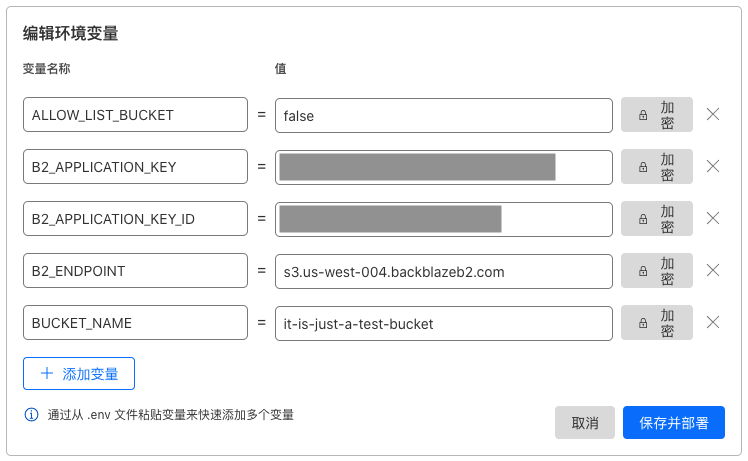
你也可以点击右侧的加密按钮对 值 进行加密(注意:加密后将无法查看!)
点击 保存并部署 按钮,完成部署。
五、自定义域名
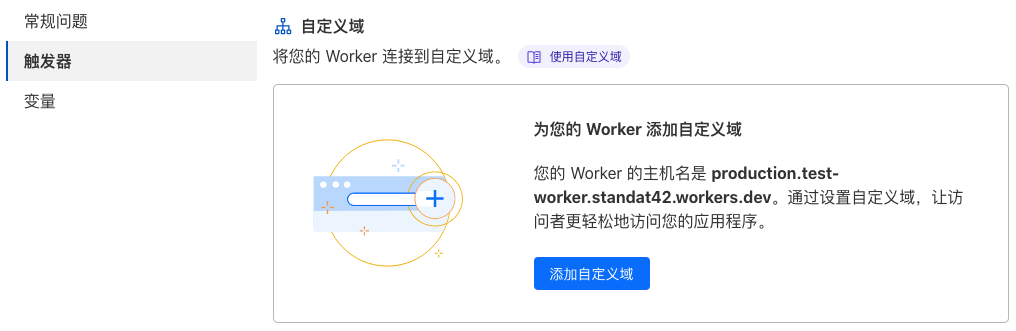
点击左侧 触发器 ,然后点击 添加自定义域 按钮:(强烈建议!)
六、配置 Backblaze B2 私密桶
回到 Backblaze ,定位到新建的私密桶,点击 Bucket Settings :
在 Bucket Info 项填入:
{"Cache-Control": "public, max-age=86400"}
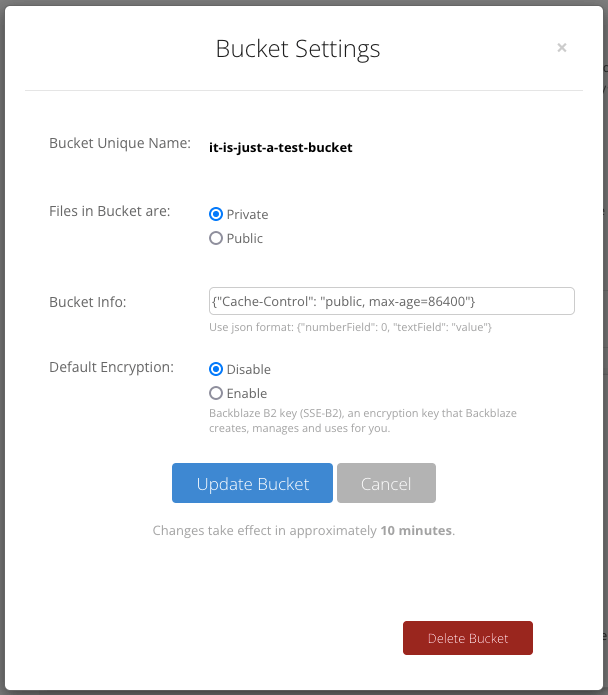
86400 表示缓存一天,你也可以设置更大。然后点击 update bucket
七、访问测试
定位到新建的私密桶,点击 Upload/Download 按钮,然后继续点击 Upload 按钮,上传一个图片,点击图片文件名,查看图片 URL:
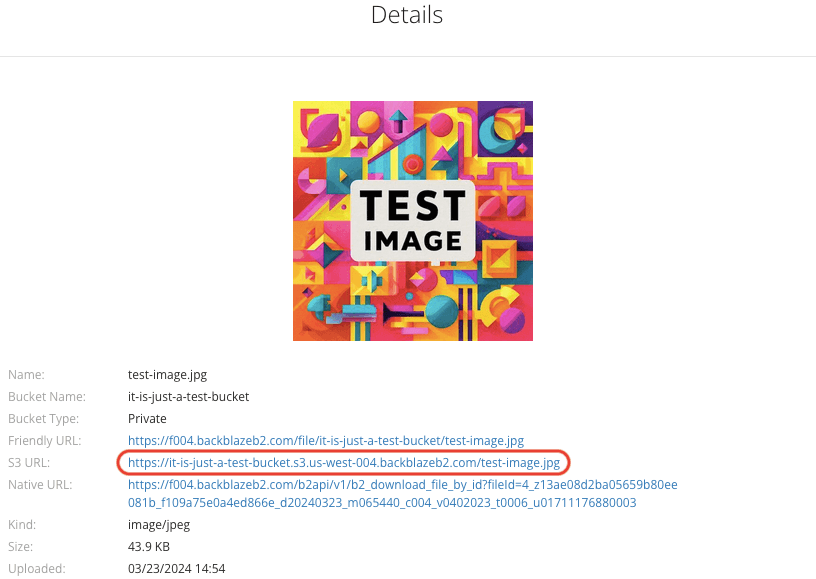
此时你直接访问 S3 URL会报错,

将S3 URL域名(上图 /test-image.jp之前的域名)改为自定义域名则可以看到图片。
说明部署的 Cloudflare Worker 生效了。
八、配置 PicGo
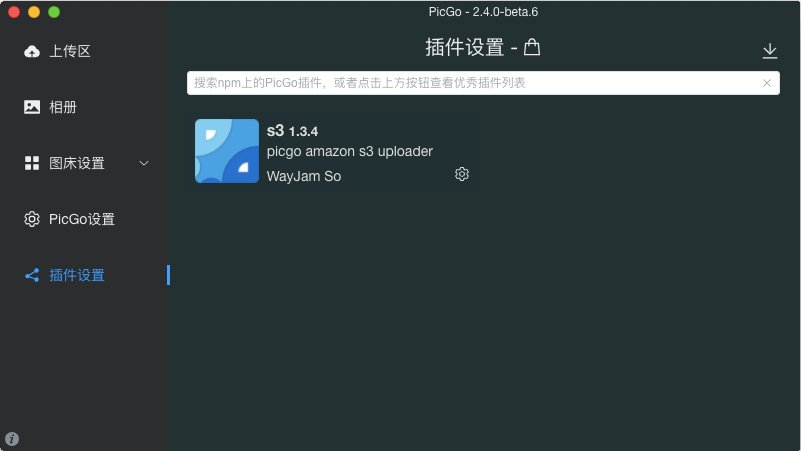
点击左侧 插件设置 ,右边搜索 S3 ,安装。
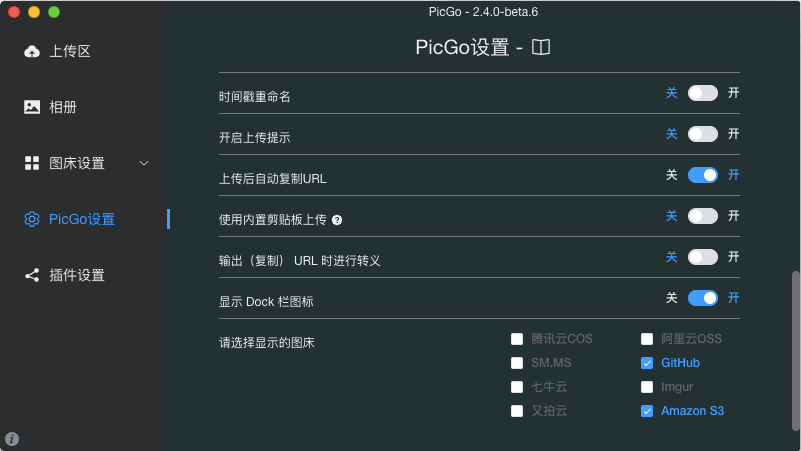
点击左侧 PicGo设置 里,右边把 Amazon S3 启用。
在左侧 图床设置 里,点击 Amazon S3 ,按要求填入信息
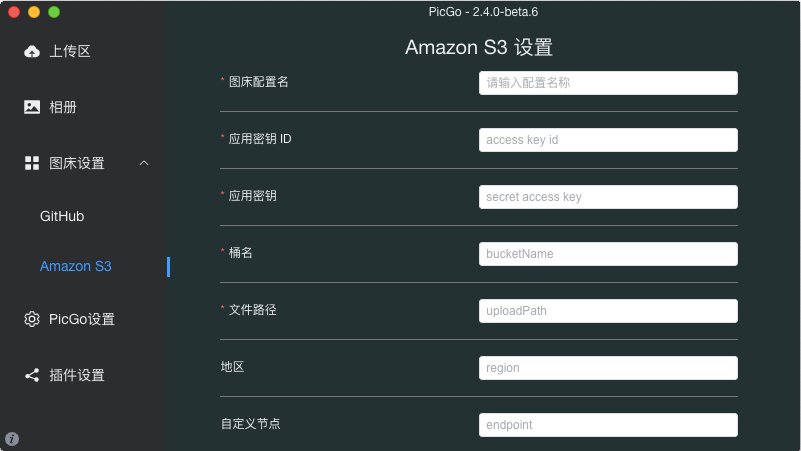
图床配置名: 自定义
应用密钥ID: 第二步保存的 keyID
应用密钥: 第二步保存的 applicationKey
桶名: 第一步创建的私密桶名
文件路径: 自定义或留空
地区: 留空
自定义节点: 第一步记下的 EndPoint
代理: 留空
自定义域名: 第五步自定义的域名
其余默认
点击 确定 按钮。就可以进行图片上传测试了。
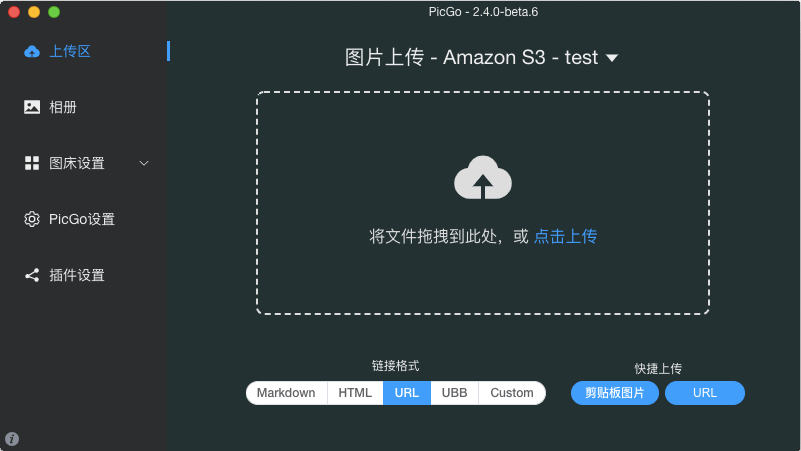
点击左侧 上传区 ,把图片拖入右边即可上传。
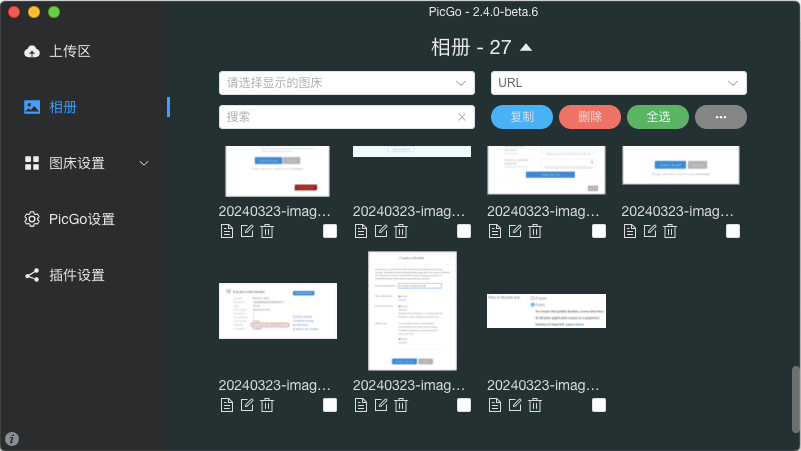
上传后点击左侧 相册 ,右边可显示已上传图片的相关信息。
发布者:木木,转载请注明出处:https://blog.huzz.cn/10254.html
 微信
微信  支付宝
支付宝