AI智能摘要
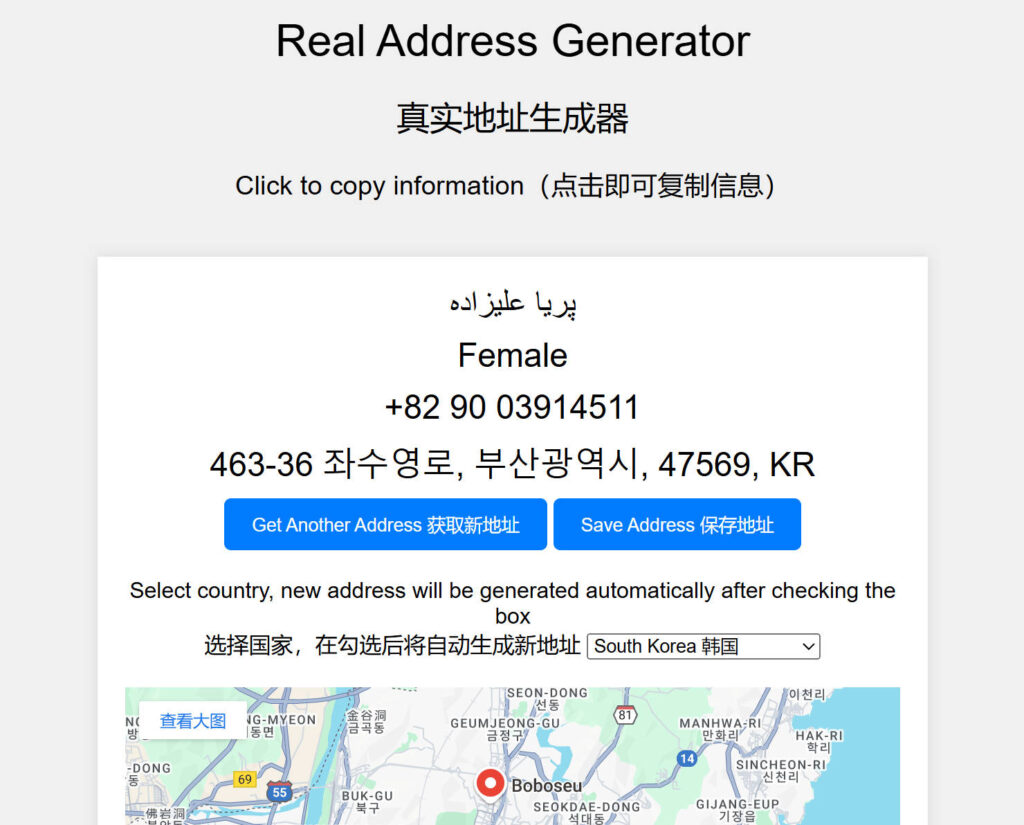
Adonis142857 开发的“Real Address Generator”(真实地址生成器)是一个基于 Cloudflare Worker 的随机地址生成工具,支持中国、美国、英国、德国、法国等27个国家和地区。该工具通过 OpenStreetMap 反向地理编码获取真实存在的地址,结合 randomuser.me 提供随机姓名、性别和手机号,并可通过 Google Maps 显示位置。用户可复制信息、保存生成的地址并添加备注。项目已开源,部署方法包括登录 Cloudflare、创建 Worker 及绑定域名。但需注意,地图内容基于 Google,国内用户可能无法正常显示。
— 此摘要由AI分析文章内容生成,仅供参考。
演示地址:点这里
功能介绍
- 生成地图上存在的随机真实地址
- 支持多国家选项
- 使用谷歌地图显示地址位置
- 生成随机的手机号,姓名和性别,并可以直接点击复制
- 支持保存生成的信息并添加备注
部署方法
1.登录您的Cloudflare账户
2.创建一个新的Cloudflare Worker
3.将以下代码复制到Cloudflare Worker代码编辑器中
addEventListener('fetch', event => {
  event.respondWith(handleRequest(event.request))
})

async function handleRequest(request) {
  const { searchParams } = new URL(request.url)
  const country = searchParams.get('country') || getRandomCountry()
  let address, name, gender, phone

  for (let i = 0; i < 100; i++) {
    const location = getRandomLocationInCountry(country)
    const apiUrl = `https://nominatim.openstreetmap.org/reverse?format=json&lat=${location.lat}&lon=${location.lng}&zoom=18&addressdetails=1`

    const response = await fetch(apiUrl, {
      headers: { 'User-Agent': 'Cloudflare Worker' }
    })
    const data = await response.json()

    if (data && data.address && data.address.house_number && data.address.road && (data.address.city || data.address.town)) {
      address = formatAddress(data.address, country)
      break
    }
  }

  if (!address) {
    return new Response('Failed to retrieve detailed address, please refresh the interface (检索详细地址失败,请刷新界面)', { status: 500 })
  }

  const userData = await fetch('https://randomuser.me/api/')
  const userJson = await userData.json()
  if (userJson && userJson.results && userJson.results.length > 0) {
    const user = userJson.results[0]
    name = `${user.name.first} ${user.name.last}`
    gender = user.gender.charAt(0).toUpperCase() + user.gender.slice(1)
    phone = getRandomPhoneNumber(country)
  } else {
    name = getRandomName()
    gender = "Unknown"
    phone = getRandomPhoneNumber(country)
  }

const html = `
<!DOCTYPE html>
<html>
<head>
  <title>Real Address Generator</title>
  <meta name="viewport" content="width=device-width, initial-scale=1.0">
  <style>
    body {
      font-family: Arial, sans-serif;
      display: flex;
      justify-content: center;
      align-items: center;
      flex-direction: column;
      min-height: 100vh;
      background-color: #f0f0f0;
      margin: 0;
    }
    .container {
      text-align: center;
      background: white;
      padding: 20px;
      box-shadow: 0 0 10px rgba(0, 0, 0, 0.1);
      width: 90%;
      max-width: 600px;
      margin: 20px;
      box-sizing: border-box;
      position: relative;
    }
    .name, .gender, .phone, .address {
      font-size: 1.5em;
      margin-bottom: 10px;
      cursor: pointer;
    }
    .refresh-btn {
      padding: 10px 20px;
      background-color: #007bff;
      color: white;
      border: none;
      border-radius: 5px;
      cursor: pointer;
      margin-bottom: 20px;
    }
    .refresh-btn:hover {
      background-color: #0056b3;
    }
    .country-select {
      margin-bottom: 20px;
    }
    .map {
      width: 100%;
      height: 400px;
      border: 0;
    }
    .title {
      font-size: 2em;
      margin: 20px 0;
    }
    .subtitle {
      font-size: 1.5em;
      margin-bottom: 20px;
    }
    .footer {
      margin-top: auto;
      padding: 10px 0;
      background-color: #f0f0f0;
      width: 100%;
      text-align: center;
      font-size: 0.9em;
    }
    .footer a {
      color: #007bff;
      text-decoration: none;
    }
    .footer a:hover {
      text-decoration: underline;
    }
    .copied {
      position: absolute;
      top: 10px;
      right: 10px;
      background: #28a745;
      color: white;
      padding: 5px 10px;
      border-radius: 5px;
      display: none;
    }
    .subtitle-small {
      font-size: 1.2em;
      margin-bottom: 20px;
    }
    .saved-addresses {
      width: 100%;
      border-collapse: collapse;
      margin-top: 20px;
    }
    .saved-addresses th, .saved-addresses td {
      border: 1px solid #ddd;
      padding: 8px;
      text-align: center;
    }
    .saved-addresses th {
      background-color: #f2f2f2;
    }
    .delete-btn {
      padding: 5px 10px;
      background-color: #dc3545;
      color: white;
      border: none;
      border-radius: 3px;
      cursor: pointer;
    }
    .delete-btn:hover {
      background-color: #c82333;
    }
  </style>
</head>
<body>
  <div class="title">Real Address Generator</div>
  <div class="subtitle">真实地址生成器</div>
  <div class="subtitle-small">Click to copy information(点击即可复制信息)</div>
  <div class="container">
    <div class="copied" id="copied">Copied!</div>
    <div class="name" onclick="copyToClipboard('${name}')">${name}</div>
    <div class="gender" onclick="copyToClipboard('${gender}')">${gender}</div>
    <div class="phone" onclick="copyToClipboard('${phone.replace(/[()\s-]/g, '')}')">${phone}</div>
    <div class="address" onclick="copyToClipboard('${address}')">${address}</div>
    <button class="refresh-btn" onclick="window.location.reload();">Get Another Address 获取新地址</button>
    <button class="refresh-btn" onclick="saveAddress();">Save Address 保存地址</button>
    <div class="country-select">
      <label for="country">Select country, new address will be generated automatically after checking the box</label><br>
      <span>选择国家,在勾选后将自动生成新地址</span>
      <select id="country" onchange="changeCountry(this.value)">
        ${getCountryOptions(country)}
      </select>
    </div>
    <iframe class="map" src="https://www.google.com/maps?q=${encodeURIComponent(address)}&output=embed"></iframe>
    <table class="saved-addresses" id="savedAddressesTable">
      <thead>
        <tr>
          <th>操作 Operation</th>
          <th>备注 Notes</th>
          <th>姓名 Name</th>
          <th>性别 Gender</th>
          <th>电话号码 Phone number</th>
          <th>地址 Address</th>
        </tr>
      </thead>
      <tbody>
        <!-- 动态生成的内容 -->
      </tbody>
    </table>
    </div>
  <div class="footer">
  Original version by chatgpt.org.uk, modified by Adonis142857 | <a href="https://github.com/Adonis142857/Real-Address-Generator" target="_blank"><img src="https://pic.imgdb.cn/item/66e7ab36d9c307b7e9cefd24.png" alt="GitHub" style="width: 20px; height: 20px; vertical-align: middle; position: relative; top: -3px;"></a>
</div>


  <script>
    function copyToClipboard(text) {
      navigator.clipboard.writeText(text).then(() => {
        const copied = document.getElementById('copied')
        copied.style.display = 'block'
        setTimeout(() => {
          copied.style.display = 'none'
        }, 2000)
      })
    }
    function changeCountry(country) {
      window.location.href = \`?country=\${country}\`
    }
    function saveAddress() {
      const note = prompt('请输入备注(可以留空)| Please enter a note (can be left blank)') || '';
      const savedAddresses = JSON.parse(localStorage.getItem('savedAddresses') || '[]');
      const newEntry = {
        note: note,
        name: '${name}',
        gender: '${gender}',
        phone: '${phone.replace(/[()\\s-]/g, '')}',
        address: '${address}'
      };
      savedAddresses.push(newEntry);
      localStorage.setItem('savedAddresses', JSON.stringify(savedAddresses));
      renderSavedAddresses();
    }


    // 渲染保存的地址
    function renderSavedAddresses() {
      const savedAddresses = JSON.parse(localStorage.getItem('savedAddresses') || '[]');
      const tbody = document.getElementById('savedAddressesTable').getElementsByTagName('tbody')[0];
      tbody.innerHTML = '';
      savedAddresses.forEach((entry, index) => {
        const row = tbody.insertRow();
        const deleteCell = row.insertCell();
        const noteCell = row.insertCell();
        const nameCell = row.insertCell();
        const genderCell = row.insertCell();
        const phoneCell = row.insertCell();
        const addressCell = row.insertCell();

        // 删除按钮
        const deleteBtn = document.createElement('button');
        deleteBtn.textContent = '删除 Delete';
        deleteBtn.className = 'delete-btn';
        deleteBtn.onclick = () => {
          savedAddresses.splice(index, 1);
          localStorage.setItem('savedAddresses', JSON.stringify(savedAddresses));
          renderSavedAddresses();
        };
        deleteCell.appendChild(deleteBtn);

        noteCell.textContent = entry.note;
        nameCell.textContent = entry.name;
        genderCell.textContent = entry.gender;
        phoneCell.textContent = entry.phone;
        addressCell.textContent = entry.address;
      });
    }

    // 页面加载时渲染已保存的地址
    window.onload = function() {
      renderSavedAddresses();
    };
  </script>
</body>
</html>
`


  return new Response(html, {
    headers: { 'content-type': 'text/html;charset=UTF-8' },
  })
}

function getRandomLocationInCountry(country) {
  const countryCoordinates = {
    "US": [{ lat: 37.7749, lng: -122.4194 }, { lat: 34.0522, lng: -118.2437 }],
    "UK": [{ lat: 51.5074, lng: -0.1278 }, { lat: 53.4808, lng: -2.2426 }],
    "FR": [{ lat: 48.8566, lng: 2.3522 }, { lat: 45.7640, lng: 4.8357 }],
    "DE": [{ lat: 52.5200, lng: 13.4050 }, { lat: 48.1351, lng: 11.5820 }],
    "CN": [{ lat: 39.9042, lng: 116.4074 }, { lat: 31.2304, lng: 121.4737 }],
    "TW": [{ lat: 25.0330, lng: 121.5654 }, { lat: 22.6273, lng: 120.3014 }],
    "HK": [{ lat: 22.3193, lng: 114.1694 },{ lat: 22.3964, lng: 114.1095 }],
    "JP": [{ lat: 35.6895, lng: 139.6917 }, { lat: 34.6937, lng: 135.5023 }],
    "IN": [{ lat: 28.6139, lng: 77.2090 }, { lat: 19.0760, lng: 72.8777 }],
    "AU": [{ lat: -33.8688, lng: 151.2093 }, { lat: -37.8136, lng: 144.9631 }],
    "BR": [{ lat: -23.5505, lng: -46.6333 }, { lat: -22.9068, lng: -43.1729 }],
    "CA": [{ lat: 43.651070, lng: -79.347015 }, { lat: 45.501690, lng: -73.567253 }],
    "RU": [{ lat: 55.7558, lng: 37.6173 }, { lat: 59.9343, lng: 30.3351 }],
    "ZA": [{ lat: -33.9249, lng: 18.4241 }, { lat: -26.2041, lng: 28.0473 }],
    "MX": [{ lat: 19.4326, lng: -99.1332 }, { lat: 20.6597, lng: -103.3496 }],
    "KR": [{ lat: 37.5665, lng: 126.9780 }, { lat: 35.1796, lng: 129.0756 }],
    "IT": [{ lat: 41.9028, lng: 12.4964 }, { lat: 45.4642, lng: 9.1900 }],
    "ES": [{ lat: 40.4168, lng: -3.7038 }, { lat: 41.3851, lng: 2.1734 }],
    "TR": [{ lat: 41.0082, lng: 28.9784 }, { lat: 39.9334, lng: 32.8597 }],
    "SA": [{ lat: 24.7136, lng: 46.6753 }, { lat: 21.3891, lng: 39.8579 }],
    "AR": [{ lat: -34.6037, lng: -58.3816 }, { lat: -31.4201, lng: -64.1888 }],
    "EG": [{ lat: 30.0444, lng: 31.2357 }, { lat: 31.2156, lng: 29.9553 }],
    "NG": [{ lat: 6.5244, lng: 3.3792 }, { lat: 9.0579, lng: 7.4951 }],
    "ID": [{ lat: -6.2088, lng: 106.8456 }, { lat: -7.7956, lng: 110.3695 }]
  }
  const coordsArray = countryCoordinates[country]
  const randomCity = coordsArray[Math.floor(Math.random() * coordsArray.length)]
  const lat = randomCity.lat + (Math.random() - 0.5) * 0.1
  const lng = randomCity.lng + (Math.random() - 0.5) * 0.1
  return { lat, lng }
}

function formatAddress(address, country) {
  return `${address.house_number} ${address.road}, ${address.city || address.town || address.village}, ${address.postcode || ''}, ${country}`;
}


function getRandomPhoneNumber(country) {
  const phoneFormats = {
    "US": () => {
      const areaCode = Math.floor(200 + Math.random() * 800).toString().padStart(3, '0')
      const exchangeCode = Math.floor(200 + Math.random() * 800).toString().padStart(3, '0')
      const lineNumber = Math.floor(1000 + Math.random() * 9000).toString().padStart(4, '0')
      return `+1 (${areaCode}) ${exchangeCode}-${lineNumber}`
    },
    "UK": () => {
      const areaCode = Math.floor(1000 + Math.random() * 9000).toString()
      const lineNumber = Math.floor(100000 + Math.random() * 900000).toString()
      return `+44 ${areaCode} ${lineNumber}`
    },
    "FR": () => {
      const digit = Math.floor(1 + Math.random() * 8)
      const number = Array.from({ length: 8 }, () => Math.floor(Math.random() * 10)).join('')
      return `+33 ${digit} ${number}`
    },
    "DE": () => {
      const areaCode = Math.floor(100 + Math.random() * 900).toString()
      const number = Array.from({ length: 7 }, () => Math.floor(Math.random() * 10)).join('')
      return `+49 ${areaCode} ${number}`
    },
    "CN": () => {
      const prefix = Math.floor(130 + Math.random() * 60).toString()
      const number = Array.from({ length: 8 }, () => Math.floor(Math.random() * 10)).join('')
      return `+86 ${prefix} ${number}`
    },
    "TW": () => {
      const number = Array.from({ length: 8 }, () => Math.floor(Math.random() * 10)).join('');
      return `+886 9${number}`;
    },
    "HK": () => {
      const number = Array.from({ length: 8 }, () => Math.floor(Math.random() * 10)).join('');
      return `+852 ${number}`;
    },
    "JP": () => {
      const areaCode = Math.floor(10 + Math.random() * 90).toString()
      const number = Array.from({ length: 8 }, () => Math.floor(Math.random() * 10)).join('')
      return `+81 ${areaCode} ${number}`
    },
    "IN": () => {
      const prefix = Math.floor(700 + Math.random() * 100).toString()
      const number = Array.from({ length: 7 }, () => Math.floor(Math.random() * 10)).join('')
      return `+91 ${prefix} ${number}`
    },
    "AU": () => {
      const areaCode = Math.floor(2 + Math.random() * 8).toString()
      const number = Array.from({ length: 8 }, () => Math.floor(Math.random() * 10)).join('')
      return `+61 ${areaCode} ${number}`
    },
    "BR": () => {
      const areaCode = Math.floor(10 + Math.random() * 90).toString()
      const number = Array.from({ length: 8 }, () => Math.floor(Math.random() * 10)).join('')
      return `+55 ${areaCode} ${number}`
    },
    "CA": () => {
      const areaCode = Math.floor(200 + Math.random() * 800).toString().padStart(3, '0')
      const exchangeCode = Math.floor(200 + Math.random() * 800).toString().padStart(3, '0')
      const lineNumber = Math.floor(1000 + Math.random() * 9000).toString().padStart(4, '0')
      return `+1 (${areaCode}) ${exchangeCode}-${lineNumber}`
    },
    "RU": () => {
      const areaCode = Math.floor(100 + Math.random() * 900).toString()
      const number = Array.from({ length: 7 }, () => Math.floor(Math.random() * 10)).join('')
      return `+7 ${areaCode} ${number}`
    },
    "ZA": () => {
      const areaCode = Math.floor(10 + Math.random() * 90).toString()
      const number = Array.from({ length: 7 }, () => Math.floor(Math.random() * 10)).join('')
      return `+27 ${areaCode} ${number}`
    },
    "MX": () => {
      const areaCode = Math.floor(10 + Math.random() * 90).toString()
      const number = Array.from({ length: 8 }, () => Math.floor(Math.random() * 10)).join('')
      return `+52 ${areaCode} ${number}`
    },
    "KR": () => {
      const areaCode = Math.floor(10 + Math.random() * 90).toString()
      const number = Array.from({ length: 8 }, () => Math.floor(Math.random() * 10)).join('')
      return `+82 ${areaCode} ${number}`
    },
    "IT": () => {
      const areaCode = Math.floor(10 + Math.random() * 90).toString()
      const number = Array.from({ length: 8 }, () => Math.floor(Math.random() * 10)).join('')
      return `+39 ${areaCode} ${number}`
    },
    "ES": () => {
      const areaCode = Math.floor(10 + Math.random() * 90).toString()
      const number = Array.from({ length: 8 }, () => Math.floor(Math.random() * 10)).join('')
      return `+34 ${areaCode} ${number}`
    },
    "TR": () => {
      const areaCode = Math.floor(200 + Math.random() * 800).toString().padStart(3, '0')
      const number = Array.from({ length: 7 }, () => Math.floor(Math.random() * 10)).join('')
      return `+90 ${areaCode} ${number}`
    },
    "SA": () => {
      const areaCode = Math.floor(10 + Math.random() * 90).toString()
      const number = Array.from({ length: 7 }, () => Math.floor(Math.random() * 10)).join('')
      return `+966 ${areaCode} ${number}`
    },
    "AR": () => {
      const areaCode = Math.floor(10 + Math.random() * 90).toString()
      const number = Array.from({ length: 8 }, () => Math.floor(Math.random() * 10)).join('')
      return `+54 ${areaCode} ${number}`
    },
    "EG": () => {
      const areaCode = Math.floor(10 + Math.random() * 90).toString()
      const number = Array.from({ length: 8 }, () => Math.floor(Math.random() * 10)).join('')
      return `+20 ${areaCode} ${number}`
    },
    "NG": () => {
      const areaCode = Math.floor(10 + Math.random() * 90).toString()
      const number = Array.from({ length: 8 }, () => Math.floor(Math.random() * 10)).join('')
      return `+234 ${areaCode} ${number}`
    },
    "ID": () => {
      const areaCode = Math.floor(10 + Math.random() * 90).toString()
      const number = Array.from({ length: 8 }, () => Math.floor(Math.random() * 10)).join('')
      return `+62 ${areaCode} ${number}`
    }
  }
  return phoneFormats[country]()
}

function getRandomCountry() {
  const countries = ["US", "UK", "FR", "DE", "CN", "TW", "HK", "JP", "IN", "AU", "BR", "CA", "RU", "ZA", "MX", "KR", "IT", "ES", "TR", "SA", "AR", "EG", "NG", "ID"]
  return countries[Math.floor(Math.random() * countries.length)]
}

function getCountryOptions(selectedCountry) {
  const countries = [
    { name: "United States 美国", code: "US" },
    { name: "United Kingdom 英国", code: "UK" },
    { name: "France 法国", code: "FR" },
    { name: "Germany 德国", code: "DE" },
    { name: "China 中国", code: "CN" },
    { name: "Taiwan 中国台湾", code: "TW" },
    { name: "Hong Kong 中国香港", code: "HK" },
    { name: "Japan 日本", code: "JP" },
    { name: "India 印度", code: "IN" },
    { name: "Australia 澳大利亚", code: "AU" },
    { name: "Brazil 巴西", code: "BR" },
    { name: "Canada 加拿大", code: "CA" },
    { name: "Russia 俄罗斯", code: "RU" },
    { name: "South Africa 南非", code: "ZA" },
    { name: "Mexico 墨西哥", code: "MX" },
    { name: "South Korea 韩国", code: "KR" },
    { name: "Italy 意大利", code: "IT" },
    { name: "Spain 西班牙", code: "ES" },
    { name: "Turkey 土耳其", code: "TR" },
    { name: "Saudi Arabia 沙特阿拉伯", code: "SA" },
    { name: "Argentina 阿根廷", code: "AR" },
    { name: "Egypt 埃及", code: "EG" },
    { name: "Nigeria 尼日利亚", code: "NG" },
    { name: "Indonesia 印度尼西亚", code: "ID" }
  ]
  return countries.map(({ name, code }) => `<option value="${code}" ${code === selectedCountry ? 'selected' : ''}>${name}</option>`).join('')
}
4.保存并部署您的Worker
5.绑定你的cf域名
生成界面
相关说明
地图基于google,国内环境无法显示。但地址生成无影响。
发布者:木木,转载请注明出处:https://blog.huzz.cn/6218.html
 微信
微信  支付宝
支付宝